






Registration Guide
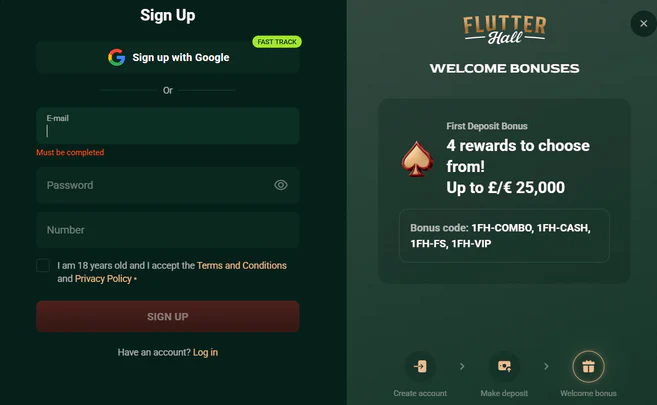
Opening an account at Flutterhall needs three entries on the sign-up form: an email address, a password and the account currency, with GBP and EUR as the two options. The email and password you choose here become the login details for both the casino lobby and the sportsbook. You pick the currency on the form itself, before any money reaches the cashier.
The smallest first deposit is £20, and you can make it with a card, an e-wallet or one of the supported coins. New accounts that fund the balance for the first time can take the welcome match of 100% up to €300, which has its own minimum and wagering in the bonus terms. Members who bet on sport use this same account for the sportsbook.
Registration runs in five steps from the form to the first payment.
- Open the Flutterhall sign-up form from the home page.
- Enter your email address and choose a password.
- Select GBP or EUR as the account currency.
- Confirm the details and accept the site terms to create the account.
- Make the first deposit with Visa, Mastercard, Skrill or another listed method.
Casino Bonuses
Flutterhall keeps its promotions to two items: a welcome match on the first deposit and a VIP programme for members who keep playing after that first payment. The match is defined by a percentage, a ceiling and a minimum deposit, with a wagering multiplier attached to it. The VIP programme runs as a separate scheme for regular customers of the casino.
| Bonus detail | Details |
|---|---|
| Welcome bonus | 100 % |
| Bonus cap | 300 € |
| Wagering requirement | x40 |
| Minimum deposit | 20 € |
Welcome Bonus
The Flutterhall bonus for new accounts is a 100% match on the first deposit, up to €300. A deposit below that ceiling is matched in full, euro for euro, and any deposit above it still earns no more than €300 in bonus funds. The match applies once, to the first payment made on the account.
The qualifying deposit for the welcome offer is €20, and a smaller first payment leaves the account without the match. You need to meet that minimum with the first deposit itself, because the offer does not carry over to later top-ups. Customers who want the full €300 need a first deposit of at least that size.
Wagering Requirements
The welcome bonus carries a wagering requirement of x40, and this must be met before any winnings from the match can leave the account. The multiplier stays the same at every deposit size, so a €20 bonus and a €300 bonus face the same x40 rule. Bonus funds that reach the end of the wagering then follow the standard withdrawal rules of the cashier.
Games at Flutterhall

More than 15,000 titles make up the Flutterhall lobby, spread across slots, jackpots, crash games, live casino, table games, poker, bingo, scratch cards and virtual sports. Virtual sports belong to the casino catalogue and run apart from the sportsbook, where members bet on real events. Poker and bingo stand beside the live tables as categories of their own, and scratch cards cover instant-win play.
Eight studios supply games to the platform: 3 Oaks Gaming, Playson, Novomatic, Pragmatic Play, Gamzix, Amatic, Endorphina and BGaming. The list pairs long-established houses such as Novomatic and Amatic with younger studios like Gamzix and BGaming. These eight names are the studios the casino lists as its game providers.
Among the titles Flutterhall puts forward are Fruit Million, Royal Dracos and Super Hot Chillies, next to Sun of Egypt 5. Blast the Bass carries a fishing theme, and Sun of Egypt 5 is the fifth game in its series. Fruit Million and Super Hot Chillies keep to fruit and chilli symbols, as their names suggest.
Jackpot games and crash games sit next to the standard reels, while live casino and table games make up the dealer and card side of the catalogue. If you also bet on sport, you can move between the lobby and the sportsbook within one account and one login.
Flutterhall Payment Methods
Five standard payment methods and five coins make up the Flutterhall cashier: Visa, Mastercard, Skrill, Neteller and bank transfer on one side, and BTC, ETH, LTC, USDT and DOGE on the other. Accounts run in GBP or EUR, the two currencies offered at sign-up. Across these methods the smallest deposit is £20 and the longest withdrawal time is 9 days, with a weekly payout cap on top.
| Method | Type | Minimum | Withdrawal |
|---|---|---|---|
| Bank transfer | Bank transfer | 20 £ | 6–9 days |
| Visa | Bank card | 20 £ | 2–5 days |
| Cryptocurrency | Cryptocurrency | 1 BTC | Instant |
Deposits
Deposits start at £20 in the account currency, and the cashier takes them by Visa and Mastercard as well as through the Skrill and Neteller wallets. Bank transfer is the fifth fiat route into the account. You can also fund the balance in crypto, with BTC and USDT the best-known coins on the list and LTC and DOGE beside them.
Withdrawals
Withdrawals reach members within 9 days at most, and that period is the slowest time the cashier sets for any method. The casino caps payouts at £3,000 per week, so a balance above that amount leaves the account in weekly parts. Before the first withdrawal, the casino verifies the identity of the account holder.
Flutterhall Casino on Mobile
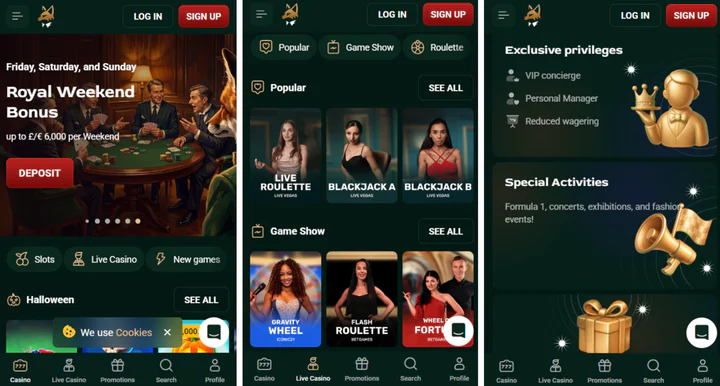
The platform supports iOS and Android, and members can use the casino and the sportsbook on phones and tablets running either system. One account covers desktop and mobile devices. You can sign in on an iPhone, an iPad or an Android device with the same email and password set at registration and reach the same balance.
Customer Support Services
Four support channels serve Flutterhall members: live chat, email, phone and an FAQ section, all listed with 24/7 hours. Phone support stands next to chat and email, so you can speak to an agent about a pending withdrawal or the x40 wagering at any time of day or night.
| Support channel | Details |
|---|---|
| Live chat | Always available |
| Telephone | Telephone support |
| Email contact | Written contact |
| Help section | Online help centre |
How to Log In to Flutterhall Casino
The Flutterhall login takes the email address and password set during registration, and the same details open the account on desktop, iOS and Android.
- Open the Flutterhall site or the mobile version on iOS or Android.
- Select the login button and enter your email address.
- Type the password chosen at registration and confirm.
- If the password is lost, use the reset option on the login form and set a new password through your registered email.


